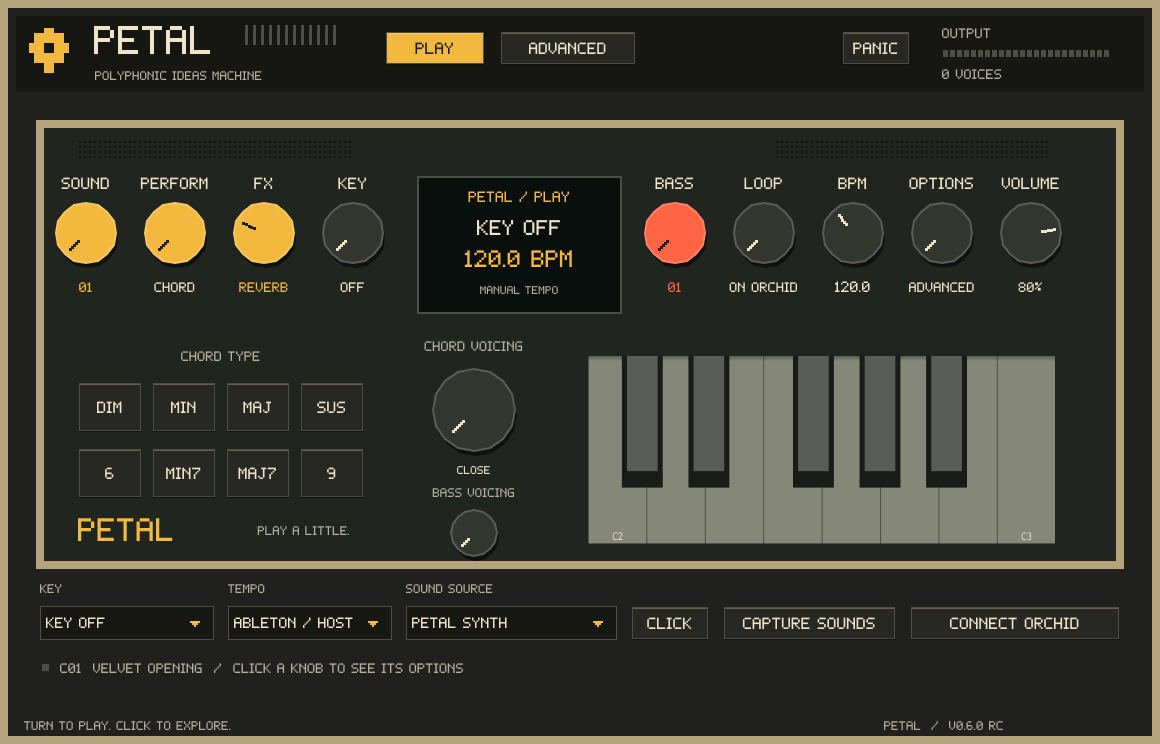
Petal is a software synthesizer and USB MIDI companion for Telepathic Instruments Orchid. Bring supported Orchid sound settings into Petal, play its local synth engine and record your Orchid MIDI performance in Ableton Live or another compatible DAW.
01 / CONNECT
Recreate sounds from USB settings.
Connect Orchid by USB-C and transfer supported sound parameters to Petal. Petal uses those settings to approximate the sound with its own engine and can retain the current treble and bass patches for playback after disconnecting Orchid.
02 / PERFORM
Record MIDI. Keep it editable.
Route Orchid’s USB MIDI to a MIDI track in Ableton Live, load Petal and record your performance. Edit the recorded notes, timing and velocities in your DAW, then play them back through Petal.
03 / SHAPE
Hardware control. On-screen feedback.
Use supported Orchid controls to shape sound settings and follow their values in Petal. The connection supports two-way editing for supported parameters; available controls depend on the Orchid firmware and connection setup.
USB carries MIDI and supported settings, not Orchid’s audio. Petal’s independent engine does not reproduce every Orchid patch exactly. MIDI recording is handled by your DAW; Petal does not include a built-in MIDI recorder.
01 / THE INSTRUMENT
A small universe of sound.
Warm chords. Glassy keys. Reeds with a little grain. Three distinct engines, two playable layers, and enough room to make a sound your own.
PETAL / PERFORMANCE SYNTHESIZERTHE ACTUAL INTERFACE
50CHORD SOUNDS
12BASS SOUNDS
3LOCKABLE EFFECT GROUPS
122PETAL PARAMETERS
02 / LISTEN CLOSELY
Less talk. More feeling.
Six new performances rendered with Petal’s own synth engine. From spacious extended chords to bright arpeggios and syncopated bass. Choose a sound and press play.
Ready when you are.
03 / THREE WAYS IN
Follow your ears.
I
Analog
Saw, pulse and sine colours. A familiar starting point for warm pads, rounded bass and bright, moving chords.
II
FM
Four parallel two-operator voices. Find the space between a delicate glass tone and an electric, metallic edge.
III
Reed
A harmonic reed model with a changing attack. Soft, woody character that sits somewhere between keys and breath.
04 / MAKE IT YOURS
A little movement goes a long way.
Layer your ideas.
Choose from 50 chord sounds and 12 dedicated bass sounds. Play incoming MIDI, or turn one note into a chord with 12 qualities and four voicings. Treble and bass each have their own engine, tone and filter.
Let the sound wander.
Four oscillators, four AHDSR envelopes, four free-running LFOs and eight modulation routes.
Give it somewhere to live.
Shape chorus, stereo delay and reverb. Lock modulation, delay or reverb to keep your settings as you explore presets. Effect tails carry across sound changes.
YOUR NEXT IDEA STARTS HERE
Make something only you would make.
PETAL / SOFTWARE INSTRUMENT
Meet your next sound.
Petal 0.6.0 is available as a development build. Explore the sounds while purchases are being prepared.
Three engines · independent treble and bass layers
No activation or subscription in the instrument
Current source edition: AGPL-3.0-only
0.6.0 development builds: Mac AU, VST3 and standalone for Apple Silicon + Intel; Windows x64 VST3 and standalone. Native installation and plugin-loading checks passed. Installers are unsigned/not notarized; physical Orchid and DAW compatibility testing is ongoing.
05 / GOOD TO KNOW
A few practical things.
Do I need an Orchid?
No. Petal accepts standard MIDI notes, so you can play it with a MIDI keyboard or notes in your DAW. Its treble and bass routing is also designed for Orchid's MIDI workflow.
Does Petal transfer Orchid's original sounds?
Petal receives supported Orchid sound settings and controls over USB MIDI and generates audio locally. It can retain the current treble and bass patches for disconnected playback. Its independent sound engine is approximate; identical Orchid or Pistil sound is not established. No Orchid audio travels over USB.
How do I use it in Ableton?
Install the VST3, enable “Use VST3 Plug-In System Folders” in Live's Plug-Ins settings, rescan, then load Petal on a MIDI track. The included guide explains USB connection, independent treble/bass layers, key and tempo controls.
What will I receive?
The current 0.6.0 development package contains Mac and Windows installers, 50 chord sounds, 12 bass sounds, an installation guide and corresponding source. The final contents offered for sale will be listed here when purchases open.
Can I use it in music I release?
Yes. Petal does not claim ownership of the music you make with it. The current software licence is AGPL-3.0-only; its source and redistribution rights are described in the supplied licence.
Where can I get support?
Installation and Orchid MIDI setup instructions are included with Petal. Contact details will be published when purchases open.
 PETAL